


Table of Contents
A library desk is answering patron questions while staff update event pages, check circulation notes, and search policy documents. That’s where AI is already showing up, not as a future idea, but as another tool in the daily queue. Microsoft and LinkedIn reported that 75% of knowledge workers use AI at work.
AI Appreciation Day and Artificial Intelligence Appreciation Day are useful reminders that value depends on clear goals, secure systems, trained staff, and human review.
Matt Elias, COO at Outsource Solutions Group, notes: “AI works best when teams start with a real workflow, protect the data involved, and assign a person to review the final output before it moves forward.”
When Is AI Day And Why IT Belongs On The Business Calendar
AI-related awareness terms show up in several places online, so asking when is AI Day makes sense. The date is commonly associated with July 16, with one calendar listing it on Thursday, 16 July 2026, and noting it was introduced in 2021 by Jason Kirton as a fixed time to review AI benefits and risks. Businesses can treat it as an awareness moment, not a federal holiday, and can use it to review how AI affects operations, customer service, security, and decision-making.
Key examples of this include:
-
Daily software exposure: AI appears inside office tools, search, CRM systems, help desk tools, accounting platforms, and document systems.
-
Operational review point: Leaders can ask where AI is already being used in tickets, invoices, proposals, and customer replies.
-
Policy timing issue: Employee use often moves faster than rules, training, and approval.
-
Business value filter: Useful AI starts with a clear workflow problem, not a tool purchase.
|
Business Function |
Practical Review Question |
Evidence to Pull |
Likely Owner |
|---|---|---|---|
|
Customer Support |
Are chatbot escalations reaching the right queue when billing, outage, or refund language appears? |
Zendesk escalation logs, chatbot transcripts, unresolved ticket tags |
Director of Customer Experience |
|
Sales Operations |
Are AI-generated CRM notes creating duplicate contacts or inaccurate next-step reminders? |
Salesforce activity history, duplicate lead reports, rep-entered correction notes |
Sales Operations Manager |
|
Finance |
Can invoice coding suggestions be traced back before payments are approved? |
Accounts payable audit trail, NetSuite approval records, vendor master changes |
Controller |
|
Information Security |
Are employees pasting customer data, contract terms, or credentials into unapproved AI tools? |
CASB alerts, browser extension inventory, data loss prevention events |
Security Operations Lead |
Artificial Intelligence Day In Everyday Operations
Artificial intelligence means systems that perform tasks associated with human thinking. Examples include recognizing patterns, predicting outcomes, summarizing information, and supporting decisions. Artificial Intelligence Day matters because these tools are no longer limited to software companies. Anthropic research found educational uses made up more than 7% of conversations. This tracks with real work in classrooms, libraries, training teams, and knowledge desks.
Examples of this idea are:
A library can use AI-assisted search to route patron questions to the right policy, database, or staff member. A manufacturer can summarize production tickets before a supervisor reviews downtime patterns. A property manager can sort invoice details before approval. Legal and finance teams can draft, compare, and review routine documents. Retail, nonprofit, and professional services teams can do the same.
Daily exposure helps only when the organization is ready to govern it. That means clean data, connected systems, and security controls. It also means staff training and clear approval paths before AI becomes part of daily work.
The four capability areas are data quality, system integration, security controls, and staff training.
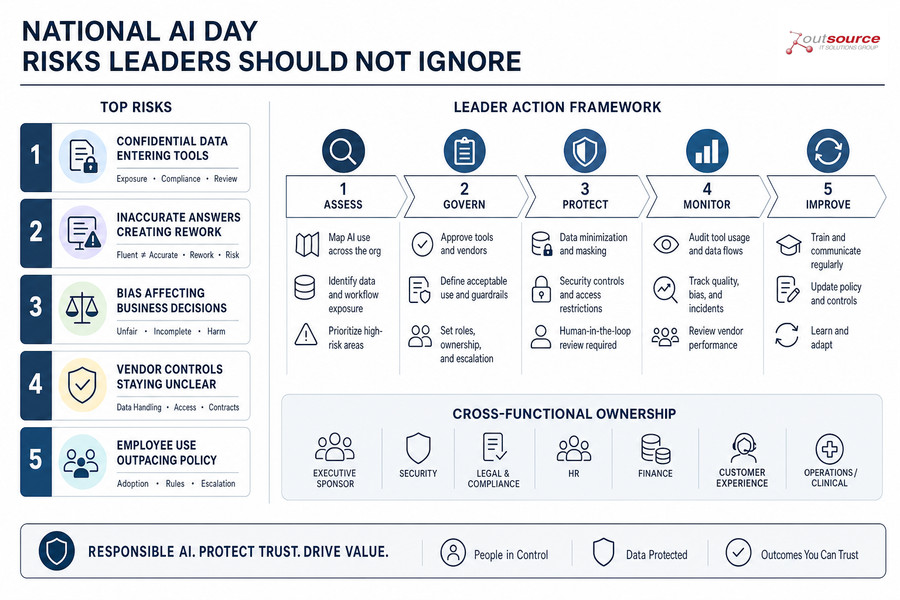
National AI Day Risks That Leaders Should Not Ignore
Unmanaged AI use creates business risk when it touches customer records, contracts, patient details, or employee files. Financial data carries the same concern. Shadow AI means employees using AI tools without approval or clear rules. Human-in-the-loop review means people remain responsible for checking and approving AI-assisted work before it affects a client, vendor, regulator, or internal decision. National AI Day is a good time to review cybersecurity, compliance, and operational controls, especially as 65 % of brands say data privacy rules limit AI personalization.
Key examples of this include:
-
Confidential data entering tools: Staff may paste client data, medical details, legal notes, or financial records into unapproved platforms. Internal plans create the same exposure and can lead to client notification, legal review, or failed compliance checks.
-
Inaccurate answers creating rework: Large language models can produce fluent but unsupported responses. Customer-facing or regulated content needs review before it becomes a proposal, patient message, legal summary, or vendor communication.
-
Bias affecting business decisions: HR, finance, healthcare, and customer service workflows need checks for unfair or incomplete outputs. Poor review can lead to inconsistent decisions, customer complaints, or delayed approvals.
-
Vendor controls staying unclear: AI vendors should be reviewed for data handling, retention, access controls, and contract terms. If those answers are unclear, the business owns the risk when data leaves approved systems.
-
Employee use outpacing policy: Staff need approved tools, acceptable use rules, and escalation paths. Without them, every department creates its own process, and IT has less visibility into data exposure and support issues.
More IT Articles to Read Next:
AI Appreciation Day As A Readiness Checkpoint
Useful AI adoption begins with readiness, not a broad transformation plan. Stanford HAI reported that U.S. private AI investment reached $109.1 billion in 2024, but the better internal question is practical: which workflow is worth improving, and what risk comes with changing it?
Examples of this idea are:
-
Map current use: Organizations should identify where employees already use AI tools and what data enters those tools. Include prompts with client records, financial details, ticket notes, or internal plans.
-
Pick one workflow: Teams should start with repeatable work like RFP review, help desk routing, or document drafting. Financial analysis, social media content support, software integration, and administrative automation can also fit.
-
Check the data: Leaders should confirm that source data is accurate, accessible, and approved. Then decide whether AI may summarize, compare, draft, or route that information.
-
Assign review ownership: The business should define who approves outputs before they reach clients, patients, vendors, or regulators. Internal decision-makers need the same review path.
-
Set working rules: Organizations should create guidance for approved tools, prohibited data, staff training, and escalation. Include cybersecurity support, compliance needs, CMMC requirements, and healthcare or legal review. Account for patching dependencies, cloud access, and infrastructure readiness.
Check Your AI Readiness
Turn AI Appreciation Day into a practical review of your workflows, data risks, and support needs with Outsource Solutions Group.
Artificial Intelligence Appreciation Day And The Next Practical Conversation
AI deserves attention when it improves real workflows. Examples include help desk ticket routing, RFP document review, financial data summaries, and invoice approval packets. Each use case needs secure data, clear ownership, and human review.
Outsource Solutions Group helps organizations think through AI readiness, cybersecurity, compliance, and IT operations. It also helps evaluate practical workflow use cases. The same discipline applies to managed IT, cloud, help desk, and patching. It also applies to infrastructure planning and security reviews. An accountable IT partner can pair integrated cybersecurity with regular reviews and guidance from account and technical managers.
Organizations that already see AI at the library desk, in production tickets, or inside invoice approvals can contact Outsource Solutions Group for a grounded AI readiness discussion.